
AI Poster Design vs. Canva: Which Maker Is Best For You?
Crafting professional posters quickly and easily is a common challenge for marketers, small business owners, and students alike. The digital design landscape is dominated by two powerful approaches: innovative AI generation and traditional template editors. This article explores the cutting edge of ai poster design tools and compares it to the established template-based model of Canva. If you're wondering what is the best AI poster design tool for your specific needs?, this guide will help you decide which platform best aligns with your goals for speed, originality, and ease of use. For those ready to leap into the future of design, you can try our free tool to see the difference.
Understanding AI Poster Generators: The Future of Design
The rise of artificial intelligence has revolutionized creative fields, and graphic design is no exception. AI poster generators represent a paradigm shift, moving away from modifying pre-made layouts to creating entirely new visuals from scratch. This technology is built on the simple yet powerful idea of turning your words into compelling art.
From Text to Visuals: The Power of AI-Driven Creation
At the heart of an AI poster maker is the "text-to-image" engine. Instead of browsing endless templates, you simply describe your vision in a text prompt. For instance, you could type "A minimalist poster for a coffee shop's jazz night, with a saxophone and steam rising, in vintage sepia tones." The AI interprets this prompt, understanding the objects, mood, and style, and generates a completely original poster in seconds. This allows you to design your own poster from text, bypassing the need for any manual design skills or complex software. The process is intuitive, creative, and empowers anyone to become a designer.
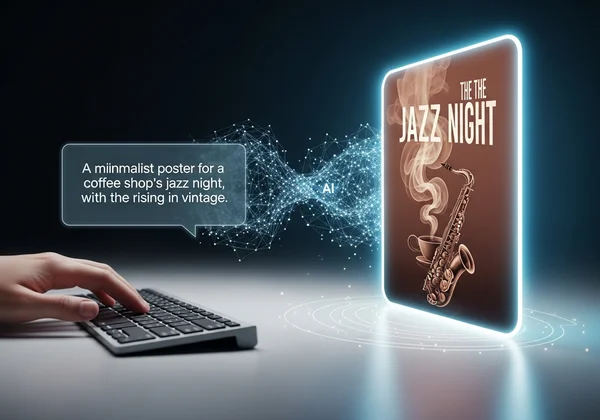
Unmatched Speed and Originality for Diverse Projects
The two standout benefits of this approach are incredible speed and true originality. A traditional design process can take hours, from finding the right template to adjusting every element. An AI tool delivers multiple unique options in under a minute, making fast poster creation a reality. This is a game-changer for marketers like "Sarah" who face tight deadlines for social media campaigns or event promotions. Furthermore, because the AI generates each design from its understanding of your prompt, the output is unique. You avoid the "cookie-cutter" look that can come from popular templates, ensuring your brand or event stands out with a unique poster design.
Exploring Traditional Template Editors: The Canva Approach
For years, platforms like Canva have been the go-to solution for non-designers needing to create professional-looking graphics. Their success is built on a massive library of pre-made templates and a user-friendly, drag-and-drop interface that simplifies the design process for millions.
Advantages of Template-Based Design for Quick Edits
The primary advantage of a template-based editor is its structured environment. Users can select from thousands of free poster design templates categorized by event, industry, or style. This provides a solid starting point, which is particularly helpful for users who aren't sure where to begin. The drag-and-drop functionality makes it easy to swap out text, change colors, and upload your own images. This method offers a high degree of control over individual elements, making easy poster editing its core strength.
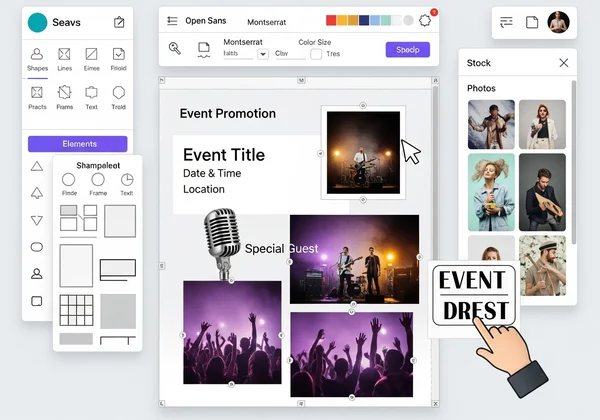
The Limitations: Originality and Customization Challenges
However, the template model has its drawbacks. The biggest challenge is originality. With millions of users relying on the same library, it's common to see generic poster designs across different brands and events. While templates are customizable, they often confine your creativity to the existing layout, making it difficult to create something truly innovative. This can be a significant issue for small business owners like "David," who want their brand to have a distinct and memorable visual identity. The creative process can become more about finding and tweaking a template than bringing a unique idea to life.
AI Poster Design vs. Canva: A Direct Feature-by-Feature Comparison
To make the best choice, let's break down how these two approaches stack up across the most important factors for users. This poster design tool comparison will clarify which platform is right for you.
Speed: Instant AI Generation vs. Template Customization Time
When it comes to pure speed from idea to finished product, AI is the clear winner. With an AI generator, your initial design is ready in seconds. The primary time investment is in refining your text prompt. In contrast, while starting with a template on Canva is fast, the customization process—finding the right font, adjusting spacing, swapping images, and ensuring everything looks balanced—can easily stretch into an hour or more. For anyone needing a fast poster maker for rapid content creation, the AI approach is unmatched.
Originality: AI's Unique Outputs vs. Template Familiarity
This is the most significant differentiator. Our AI poster generator creates visuals that have never existed before, tailored specifically to your prompt. This ensures your poster is 100% unique. Canva relies on a shared library of templates. While you can customize them, the foundational structure and style elements are used by countless others. If creating a memorable and unique poster design is your top priority, an AI generator is the superior choice. It serves as an excellent Canva alternative for posters when originality matters most.
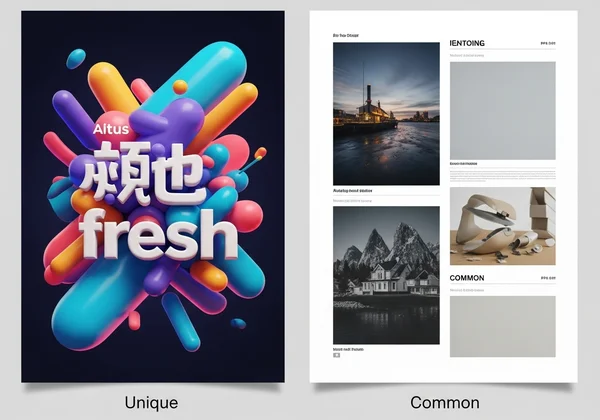
Ease of Use: Text Prompts vs. Drag-and-Drop Interfaces
Both platforms are designed for beginners, but they cater to different working styles. Canva's drag-and-drop interface is intuitive for those who like to manually adjust every element. However, it still requires a basic sense of design principles to make things look good.
Our AI poster design tool simplifies this even further. If you can describe what you want, you can create a beautiful poster. There is no need to worry about alignment, color theory, or font pairing; the AI handles the heavy lifting. This makes simple poster creation accessible to everyone, especially those who feel they have no design skills needed to get started.
Best Use Cases: Marketers, Small Businesses, or Students?
- For Marketers & Social Media Managers: When you need a high volume of unique visuals for different campaigns (e.g., A/B testing ad creative, daily social media posts), an AI generator is a powerful ally. It allows for rapid ideation and creation of diverse visuals, such as an eye-catching social media post design.
- For Small Business Owners: To build a distinct brand identity without the cost of a designer, an AI tool provides original artwork that templates cannot. You can create a cohesive set of promotional materials, from an event poster design to in-store flyers, that truly reflect your brand.
- For Students & Educators: For projects that demand creativity and a unique visual presentation, such as a scientific poster design or a school event announcement, an AI generator can help you stand out. It’s a fantastic tool for brainstorming and producing high-quality visuals quickly.
Canva remains a solid choice for tasks requiring strict brand guideline adherence where a specific template has already been approved, or for users who prefer hands-on, element-by-element manipulation of a pre-set design.
Choosing Your Ideal Poster Design Tool
The choice between AI poster design and a traditional template editor like Canva comes down to your primary goal. If you value structured, manual control and are happy to work within the confines of a pre-made layout, a template editor is a reliable option.
However, if your priority is creating truly unique, eye-catching posters with maximum speed and minimal effort, the future is clear. AI-powered poster design tools are transforming the creative landscape by putting the power of a designer into a simple text box. It empowers you to bring original ideas to life instantly, making it the ideal solution for modern marketers, innovative entrepreneurs, and creative students.
Ready to stop searching for templates and start creating from your imagination? Design your poster in seconds and experience the power of AI today!

Your Questions on AI & Traditional Poster Design Answered
What is the best AI poster design tool for beginners?
For beginners, the best tool is one that minimizes the learning curve while maximizing creative output. Our platform is an excellent choice because it eliminates the need to learn complex design software. If you can write a sentence describing your idea, you can create a professional-quality poster, making it incredibly accessible for those with no prior experience.
Can AI create a poster from text more effectively than a template editor?
Yes, for originality and creativity, AI is far more effective. A template editor only allows you to modify an existing design, but an AI generator creates a net-new visual based on your specific prompt. This means the AI can produce designs that are more aligned with your unique vision and are guaranteed to be original, which is something a template simply cannot offer.
How does AI poster design compare for creating unique event posters?
AI poster design excels at creating unique event posters. Whether you need a futuristic vibe for a tech conference or a vintage look for a local music festival, you can specify that in your prompt. The AI will generate a bespoke visual that captures the specific mood of your event, helping it stand out from the crowd. You can easily create event posters that are tailored to any theme.
Is this a good Canva alternative for custom posters?
Absolutely. This AI poster generator is an outstanding Canva alternative, especially for users who feel limited by templates and want to produce truly custom and original work. If your main goal is to create posters that don't look like anything else out there, and you want to do it faster than ever before, an AI-driven platform is the perfect choice for your needs.